

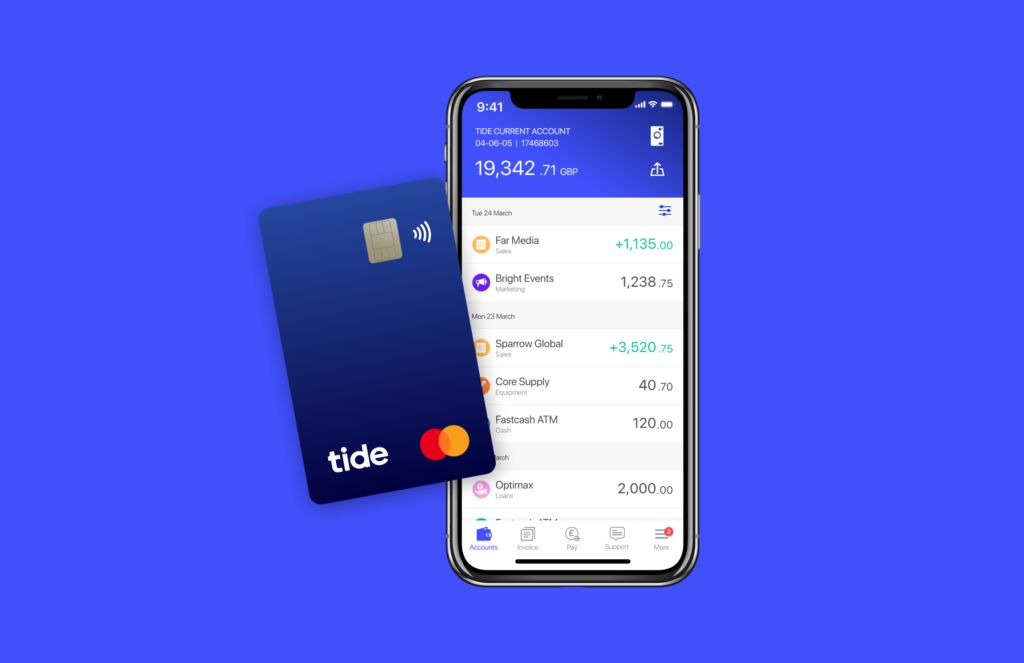
One of the first things most new business owners should do is open a business bank account. In this guide, we look at Tide, one of the UK’s leading digital banking providers for sole traders and small businesses.
Tide offers a free business bank account with £50 cashback.
The cashback offer is available to new Tide customers and is usually activated after meeting a small qualifying card spend within the promotional period. Full eligibility details are shown during the application process.
You can also add a savings account to your Tide setup and earn up to 3.74% AER on your balance.
Here is a guide to the Tide business bank account, including our verdict.
Some business banking basics
Before we look at what the Tide account can offer, here are some useful things to know about setting up a business account:
Do you need a separate bank account?
If you form a limited company, you must open a separate account in the company’s name, as it is a distinct legal entity. You can’t use your personal account for any company transactions.
If you’re self-employed (a sole trader), there is no legal obligation to open a separate bank account, but it will make life much easier if you do.
However you run your business, finding a banking provider that suits your needs is essential.
What do you need from a banking provider?
There are lots of things to consider, such as:
- Do you have a lot of monthly transactions?
- Do you need access to a branch?
- Do you need to deposit cash or cheques?
Things to look out for when comparing banks
- What is the monthly cost of the account?
- Are there any additional fees you should be aware of?
- Are there any additional benefits, such as free invoicing in accounting software?
- Is the bank FSCS protected?
The Tide business bank account – £50 cashback
More than 1.5 million UK businesses use Tide for their business banking.
You can set up an account in minutes, and as a special welcoming bonus, Bytestart visitors qualify for £50 cashback just for opening an account.
Eligible deposits are protected by the FSCS up to the applicable limits, there are no monthly or annual fees, and you can manage your account from your mobile phone or desktop.
You can open a Tide account and run it alongside a traditional business current account if you already have one.
Benefits provided by the free Tide business bank account
- Apply in minutes using the Tide app.
- There are no monthly or annual fees for the ‘free’ account.
- Free use of your MasterCard in the UK and abroad.
- Set up and amend direct debits.
- Compatible with Apple Pay and Google Pay.
- Free transfers to other Tide accounts.
- Free company formation, if needed, when opening your bank account.
- Built-in expense management tools, including receipt capture and VAT tracking.
- Tide integrates with Xero, Sage, QuickBooks, and Kashflow, so you can easily
synchronise your online accounting software
with your bank transactions. - 24-hour support via the Tide app.
- Manage your account from any device, including a laptop, tablet, or desktop.
- Cash can be deposited at more than 40,000 Post Office and PayPoint locations across the UK.
Deposit fees apply, so the account is generally better suited to businesses that only handle cash occasionally. - Tide is authorised
by the Financial Conduct Authority (FCA).
Several pricing tiers are available – Free, Plus and Pro

Free business account – no credit check. Ideal for sole traders.
Make sure you compare the different Tide account offerings: Free, Plus and Pro.
The Free account is a good option for low monthly transactions and simple banking needs.
- There is no monthly fee, but a 20p charge applies per transaction, such as bank transfers.
- There is in-app support, but no phone support is available.
The Plus account (£9.99 per month) provides one additional MasterCard for a member of your team.
- You receive 20 free monthly transactions, phone support, and a complimentary legal helpline.
The Pro account (£19.99 per month) provides the same benefits as a Plus account, including two additional MasterCards and unlimited monthly transactions.
If you have many monthly transactions, opting for the Plus or Pro account may be more cost-effective. It all depends on how your business operates.
How to open a Tide business account
The onboarding process for opening a Tide account is simple.
- Download the Tide app from the Android or Apple Store.
- Enter details about the type of business you run.
- Upload your ID to verify your identity, and upload a selfie.
- Your new bank account could be ready within minutes.
Tide may require additional information in a few cases before completing your application.
If Tide doesn’t quite fit your needs, some businesses also consider alternatives such as ANNA Money and Zempler Business Go, depending on how they trade and what features matter most.
Our verdict
Tide is a strong option for sole traders and small limited companies seeking simple, app-based banking with no monthly fees.
If you’re a freelancer, sole trader or director of a small limited company, Tide is one of the easiest business accounts to get up and running. The app is well designed, it integrates seamlessly with popular accounting software work well, and the free plan offers good value for businesses with relatively straightforward banking needs.
Businesses that regularly pay in cash or rely on branch services may be better served by a traditional high street bank, but for many modern small businesses Tide is an excellent choice.
This review is based on real-world use rather than a feature checklist.
ByteStart readers are eligible for an exclusive £50 cashback offer from Tide. Open a Tide account and claim the offer here.